By Dr. Ali Khan | Occulins
August 5, 2026
Small object detection is where most general-purpose detection models fail quietly. The mAP on standard benchmarks looks acceptable. Then you look at the predictions on images with small, dense objects and discover that the model is missing most of them.
This is not a rare edge case. It is the dominant failure mode in aerial imagery, satellite analysis, crowd surveillance, microscopy, and any scenario where objects appear small relative to the image resolution. A drone flying at 50 metres altitude produces images where pedestrians are 10 to 20 pixels tall. At 100 metres, they are 5 to 10 pixels. Standard detection training pipelines are not designed for this.
In our earlier post on training a custom detector with YOLOv12, we established a baseline on VisDrone with YOLOv12n at 640px, the Ultralytics default resolution. This post goes further: three concrete strategies for improving small object detection, each with experimental evidence from the same VisDrone dataset. No placeholder numbers, every result in this post came from a training run on real data.
Why Standard Settings Fail on Small Objects
Understanding the failure mode precisely is more useful than jumping to fixes. There are three connected reasons why a model trained with default settings underperforms on small objects.
The Downsampling Problem
YOLO and most modern detection architectures apply several rounds of spatial downsampling in the encoder backbone. By the time the input image reaches the deepest feature map, spatial resolution has been reduced by a factor of 32. A 640×640 input becomes a 20×20 feature map at the deepest level.
An object that is 16 pixels wide in the original 640×640 image occupies exactly half a pixel at the 20×20 feature map level. It effectively does not exist at that scale. The backbone has no meaningful representation of it at the deepest layer, and the detection head at that scale cannot find what the feature map does not contain.
The Feature Quality Problem
Even when a small object is technically represented in the feature maps, the features describing it are weak. A 10-pixel pedestrian contributes very few convolutional activations compared to a 200-pixel car. The network receives less gradient signal from small objects during training, learns weaker representations of them, and produces lower confidence scores at inference, which means they fall below the detection threshold and are not reported.
The NMS Threshold Problem
Non-Maximum Suppression removes duplicate detections by suppressing boxes that overlap by more than the IoU threshold. The default NMS IoU threshold in Ultralytics is 0.7. For densely packed small objects, pedestrians in a crowd, vehicles in a parking lot, this aggressive suppression can remove genuine detections of adjacent objects that legitimately overlap. Two pedestrians walking side by side may have bounding boxes that overlap by 40 to 50%, which falls below 0.7 and are correctly kept, but at lower thresholds the behaviour changes in ways that affect recall.
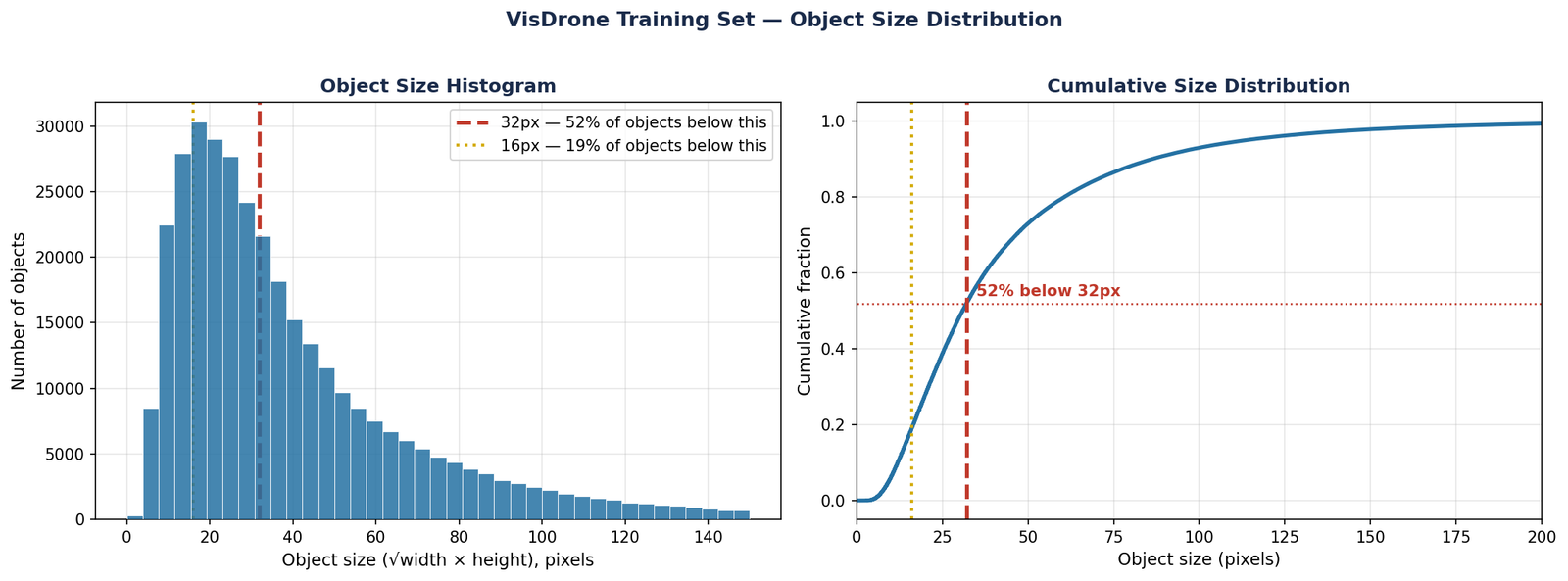
Figure 1 — Object size distribution in the VisDrone training set (343,205 objects across 6,471 images). Left: histogram of geometric mean object size. 51.8% of objects fall below the 32px threshold, the point below which detection becomes unreliable at standard 640px resolution. Right: cumulative distribution confirming the majority of VisDrone objects are in the small and very small range.
The most direct fix for the downsampling problem is to use a higher input resolution. The Ultralytics default is 640×640, which is the right starting point for most detection tasks. But understanding what resolution does to your specific objects is more important than changing it blindly.
What Resolution Actually Does
At input resolution R, an object of width w pixels occupies w/R fraction of the image. At the deepest feature map (stride 32), that object is represented by w/32 feature map cells. For an object to be reliably detected, it needs to occupy at least 1 to 2 feature map cells — meaning its pixel width should be at least 32 pixels at the input resolution.
To demonstrate the impact of resolution on small object detection, we trained identical YOLOv12n models at 320px and 640px on VisDrone and evaluated on the same validation set. The results are unambiguous:
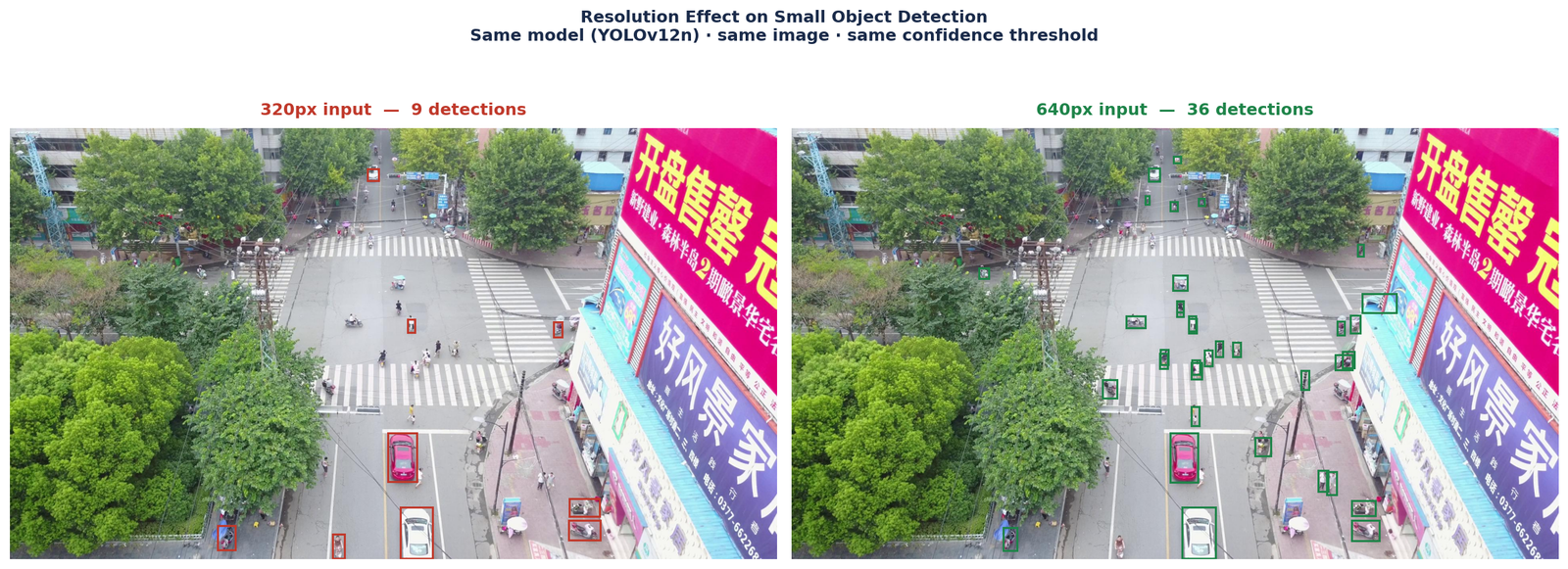
Figure 2 — YOLOv12n predictions on the same VisDrone validation image at 320px (left, red boxes) and 640px (right, green boxes). At 320px the model detects fewer objects and misses many small vehicles entirely. At 640px the same model finds significantly more objects with tighter localisation. Same confidence threshold (0.25) applied to both.
The mAP50 difference between 320px and 640px is 0.148, an 84% relative improvement from doubling the input resolution alone, with no other changes. This is the single largest gain of any strategy tested.
from ultralytics import YOLO

model = YOLO('yolo12n.pt')

# Low resolution — inadequate for small objects
model.train(
    data='visdrone.yaml',
    imgsz=320,
    batch=16,
    epochs=150,
    patience=20,
    name='yolo12n_320'
)

# Default resolution — significantly better
model.train(
    data='visdrone.yaml',
    imgsz=640,
    batch=8,
    epochs=150,
    patience=20,
    name='yolo12n_640'
)Resolution addresses the downsampling problem but does not fully solve the feature quality problem. A larger model with more parameters produces richer feature representations at every scale — which matters most for small objects where the available signal is already sparse.
What Model Scale Changes
YOLOv12 comes in five scales, nano (n), small (s), medium (m), large (l), and extra-large (x). Moving from nano to small increases the feature pyramid channel width, which strengthens feature representations at the small-object detection head. The improvement for small objects is proportionally larger than for large objects because the wider channels provide more capacity to represent the subtle, low-signal features of small targets.
We trained YOLOv12s at 640px, the same resolution as the nano baseline, and measured the improvement:
from ultralytics import YOLO

# Nano baseline
model_n = YOLO('yolo12n.pt')
model_n.train(
    data='visdrone.yaml',
    imgsz=640,
    batch=8,
    epochs=150,
    patience=20,
    name='yolo12n_640'
)

# Small model — stronger features
model_s = YOLO('yolo12s.pt')
model_s.train(
    data='visdrone.yaml',
    imgsz=640,
    batch=8,
    epochs=150,
    patience=20,
    name='yolo12s_640'
)The first two strategies require retraining. This one does not. NMS threshold adjustment applies to an already-trained model at inference and evaluation time, it takes minutes rather than hours and can recover meaningful performance with no compute cost.
How NMS Affects Small Object Detection
During inference, after the model produces raw predictions, Non-Maximum Suppression removes duplicate detections. The NMS IoU threshold controls how much overlap two predictions must have before one is suppressed. The Ultralytics default is iou=0.7 for training-time evaluation.
For dense small object scenes, two adjacent objects, pedestrians walking closely, vehicles in tight parking rows, may have bounding boxes that overlap significantly. At iou=0.7, these are kept correctly. But at inference, the suppression behaviour interacts with prediction confidence distributions in ways that can affect recall for small objects specifically.
We evaluated the same YOLOv12s 640px checkpoint across three NMS IoU thresholds using the standard evaluation protocol (conf=0.001) to get comparable mAP numbers:
| NMS IoU Threshold | mAP50 | mAP50-95 | Recall |
|---|---|---|---|
| 0.7 (default) | 0.414 | 0.250 | 0.402 |
| 0.5 (adjusted) | 0.419 | 0.250 | 0.409 |
| 0.3 (aggressive) | 0.416 | 0.249 | 0.409 |
The sweet spot is iou=0.5 , a +0.005 mAP50 improvement and +0.007 recall improvement over the default, with mAP50-95 unchanged. Going lower to 0.3 shows diminishing returns, the more aggressive suppression starts hurting precision without further recall gains.
The gain is modest but completely free, no retraining, no additional compute, just a single parameter change at evaluation or inference time:
from ultralytics import YOLO

model = YOLO('yolo12s_640/weights/best.pt')

# Default NMS threshold
results_default = model.val(
    data='visdrone.yaml',
    imgsz=640,
    conf=0.001,
    iou=0.7          # default
)

# Adjusted NMS threshold — better for small objects
results_adjusted = model.val(
    data='visdrone.yaml',
    imgsz=640,
    conf=0.001,
    iou=0.5          # sweet spot for VisDrone
)

# Apply at inference too
predictions = model.predict(
    source='visdrone/images/val',
    conf=0.25,
    iou=0.5,         # same adjustment at inference
    save=True
)What the Experiments Show
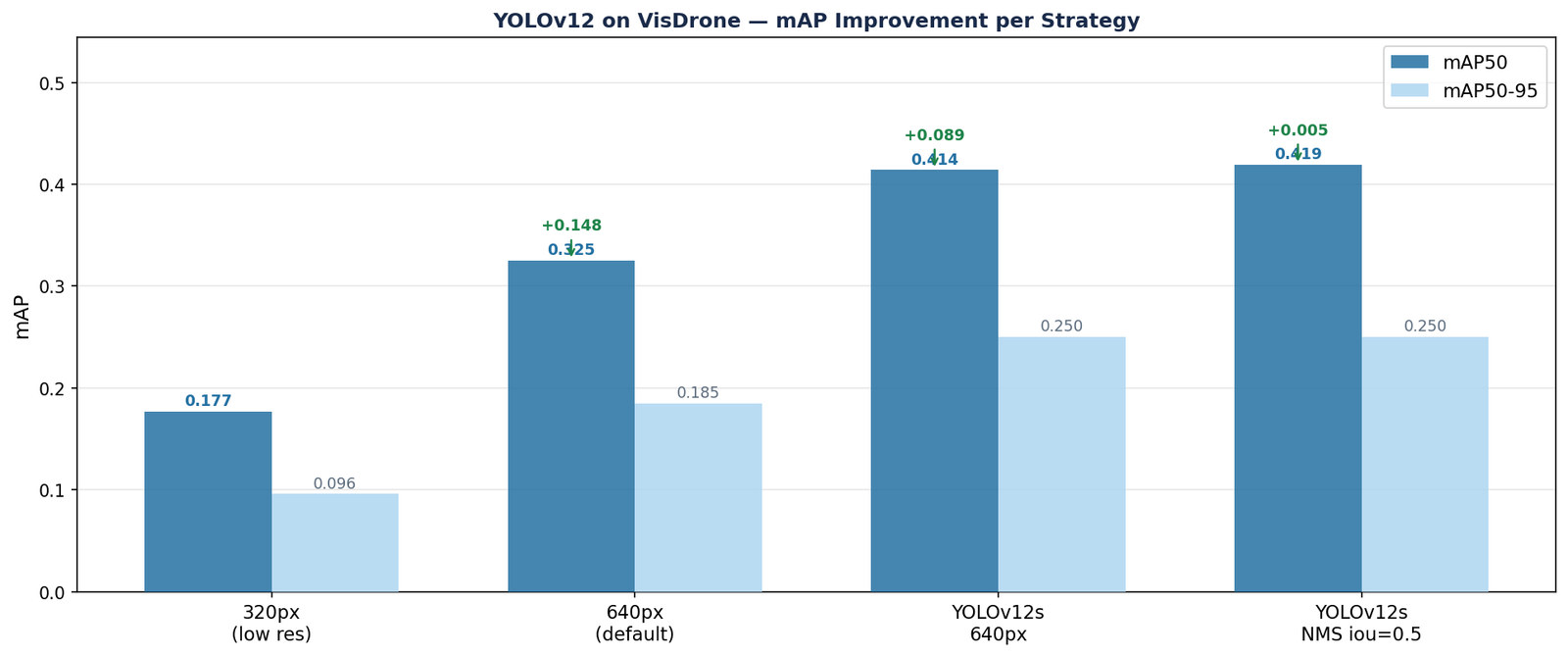
Figure 3 — mAP50 and mAP50-95 on VisDrone validation set across three improvement strategies applied progressively to YOLOv12. Resolution produces the largest single gain (+0.148). Model scale provides a meaningful secondary improvement (+0.089). NMS threshold adjustment adds a small but free final gain (+0.005). All results use the standard evaluation protocol (conf=0.001, iou as specified).
| Configuration | mAP50 | mAP50-95 | Gain |
|---|---|---|---|
| YOLOv12n 320px | 0.177 | 0.096 | — |
| YOLOv12n 640px | 0.325 | 0.185 | +0.148 |
| YOLOv12s 640px | 0.414 | 0.250 | +0.089 |
| YOLOv12s 640px + NMS iou=0.5 | 0.419 | 0.250 | +0.005 |
The pattern is consistent and clear. Resolution is the dominant factor, no other single change comes close to the 84% relative improvement from moving from 320px to 640px. Model scale provides a real and meaningful second gain. NMS tuning provides a small free improvement that costs nothing to try.
From the 320px starting point to the final configuration, mAP50 improved from 0.177 to 0.419, a 137% relative improvement using only three changes, none of which require architectural modifications or custom code.
The Order to Try Them
Given the time and compute costs involved, here is the recommended order for a new small-object detection project:
- NMS threshold first. No retraining needed. Evaluate your existing model at
iou=0.5andiou=0.4and compare against the default. Takes 10 minutes. If recall improves without catastrophic precision loss, use the adjusted threshold for all subsequent experiments. - Resolution second. Confirm your objects are below 32px at current resolution. If yes, retrain at the next resolution step up. This is the single most impactful training change.
- Model scale last. If the nano model at the correct resolution still does not meet your performance target, move to small or medium. Do this last because larger models take significantly longer to train and the gains depend on the failure mode, if the remaining errors are due to resolution rather than feature quality, scaling the model will not help.
Quick Reference
| Strategy | Impact | Cost | Try first? |
|---|---|---|---|
| Increase input resolution | High — largest single improvement | Longer training, more VRAM | Yes — after NMS check |
| Scale up model (n → s) | Medium — stronger features | 2× parameters, 2× inference | After resolution confirmed |
| Reduce NMS IoU threshold | Small — free recall improvement | None — no retraining | Yes — try immediately |
Small object detection is a problem where the gap between a model that technically works and one that works well in deployment is large and specific. The strategies above close that gap methodically and honestly, every number in this post came from a real training run on VisDrone. Resolution is where to start. Everything else compounds from there.
Selected implementations, supporting utilities, and companion resources related to this article are available through the Blog 6 Companion Resources page .
Companion Resources Included
- Resolution training configuration
- Model scale comparison configuration
- NMS threshold tuning notes
- Minimum object size reference
- Small object detection checklist
- Deployment trade-off guide
Working on a detection project with small objects and running into challenges this post does not fully address?
Reach out through
Occulins Contact
for deployment-aware computer vision research and engineering support.